From product sourcing
to multi-channel listing
A product sourcing and listing tool for cross-border resellers, dropshipping sellers in Korea, and multi-brand select shops. Collect products from 21 shopping sites such as Musinsa, Olive Young, AliExpress and Tmall, write titles and detail pages with AI, and list them on Naver Smartstore, Coupang, Cafe24, LotteON and imweb.
SelBuddy Demo Video
From sourcing to listing and order management — in one flow
Supported channels
Sales channels
Smartstore
Naver Commerce API
Cafe24
OAuth integration
LotteON
OpenAPI + Onpick
Coupang
Open Commerce API
imweb
Browser automation
Collection sites · Domestic / Global 19
Supported sourcing sites
- Musinsa
- Olive Young
- Coupang
- Naver Smartstore
- AliExpress
- Tmall
- 1688
- Alibaba.com
- The North Face
- Mizuno
- KEEN
- Hunter Boots
- Kodak
- Galleria
- Youngone Outlet
- N Station Mall
- Croket
- dk-on
- byso
- One Line Factory
- OnePick
More sites can be added on request
Built for these sellers
Cross-border reselling
Collect AliExpress and Tmall products, write Korean titles and detail pages, and list them on Korean marketplaces.
Domestic dropshipping
Import products from Korean shops such as Musinsa, Olive Young and The North Face, then set prices from cost and margin.
Select shops & multi-brand sellers
Gather products from several brand stores in one place and manage options, stock and prices together.
Bulk listing
Save selected products and upload them to your channels in one go.
Multi-channel listing
Edit once and list on Smartstore, Coupang, Cafe24, LotteON and imweb, formatted for each channel.
Everything for e-commerce automation
Let SelBuddy handle the repetitive work so you can focus on growing your business.
Image search
Upload a product image and AI identifies the brand and model, then finds the same product across multiple platforms automatically.
AI image editing
Let AI handle background touch-ups and composites, then crop, rotate, and add text with the built-in editor. Auto-split long stitched-together images too — all in one place.
Gemini AI content generation
Based on collected product data, automatically generates Smartstore-optimized product names, descriptions, categories, and tags.
Chrome extension collection
Collect product information directly from 21 shopping sites using the Chrome extension.
Real-time order notifications
Get instant alerts (SSE + Web Push) when new orders arrive. Orders are auto-collected on the interval you choose (15 minutes to 6 hours) so you never miss one.
Revenue analytics dashboard
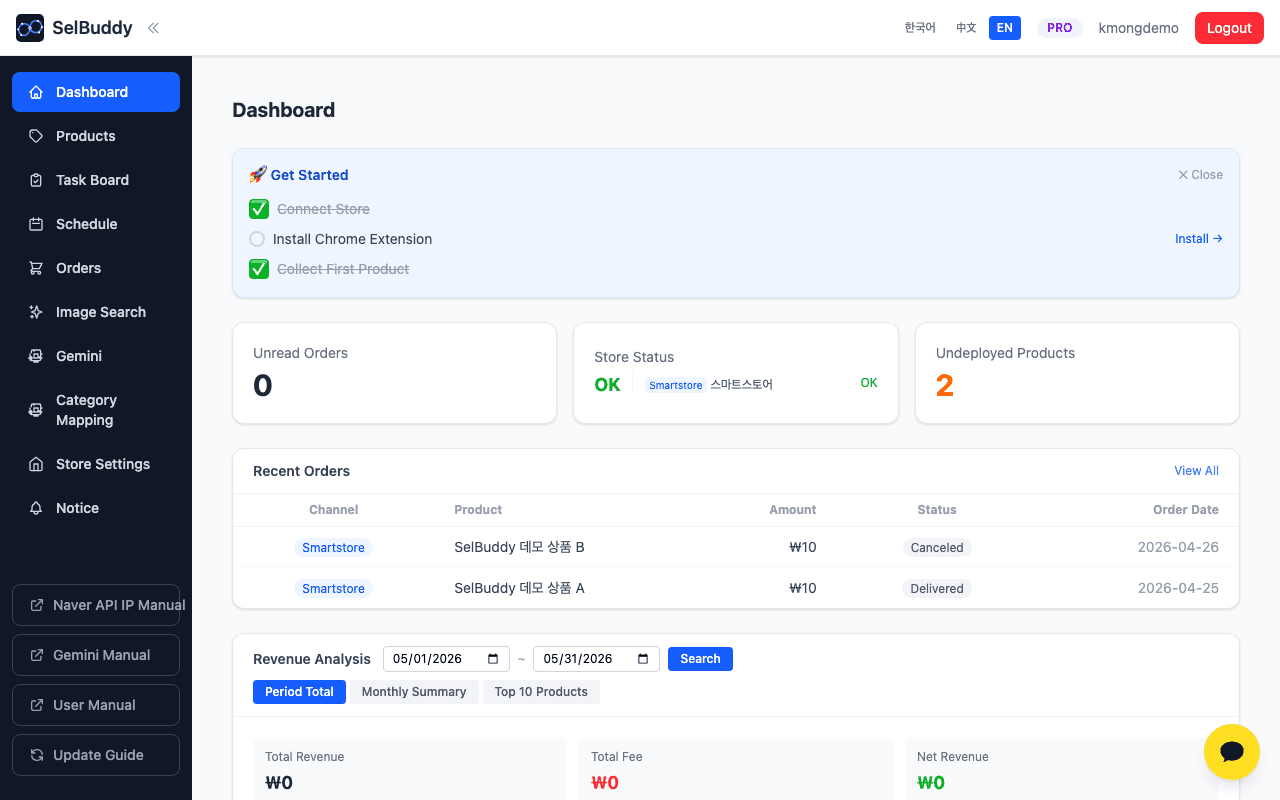
View sales, fees, and net profit by period and channel at a glance. Instantly check unread orders and unlisted products.
Task board
Kanban (TODO · DOING · BLOCKED · DONE) for tasks linked to products and orders.
Schedule
Monthly calendar with two-way links to the task board.
AI detail page generator
Gemini analyzes once, then branches into 8 category-specific prompts (Fashion, Beauty, Digital, etc.).
Market intelligence
See category-level shopping keyword rankings from Naver DataLab on the dashboard, with keyword search volume factored into AI-generated titles. (Pro/Custom)
Publish & sell
Share a public product URL, let buyers pick options, and collect payment via PayApp — directly from your page. (Custom)
Collect · Edit · List — that's all
A workflow that eliminates repetitive tasks from sourcing to revenue management
Collect
Paste a shopping mall URL, upload an image, or use the Chrome extension to collect product information from 21 shopping sites.
Edit
Gemini AI automatically generates product name, description, category, and tags. Edit the content with the rich editor and set pricing and options.
List
After review, list to Smartstore, Cafe24, LotteON, Coupang, and imweb. No repetitive input — just one button.
Orders & Revenue
Get real-time order alerts. Analyze revenue by period and channel to understand your business at a glance.
No complex setup — start collecting products right now
Start for free →See it in action
Unread orders, sync status, and revenue analysis at a glance
Per-category detail content
One shared analysis, eight category-specific prompts.
Two-stage pipeline
- 1Shared analysis of selected images and existing body copy extracts category and key attributes
- 2A category-specific prompt writes the detail page, which is then rendered as images sized for each channel
You can also design detail pages with SelBuddy Studio. Visit SelBuddy Studio →
Transparent pricing
No hidden fees — pay only for what you need
Free
Try the service at no cost
- ✓Product collection
- ✓1 sourcing site
- ✓Product editing
Standard
For sellers getting started with multi-channel listing
- ✓Everything in Free
- ✓3 sourcing sites
- ✓Listing to 5 sales channels
- ✓Multi-store integration
- ✓No product limit
- ✓Basic support
Pro
For sellers scaling with automation
- ✓Everything in Standard
- ✓Dashboard
- ✓Image search
- ✓Gemini AI content generation
- ✓Real-time order sync
- ✓Direct listing
- ✓Task board · Schedule · Memo
- ✓Market intelligence
Custom
For sellers needing tailored operations
- ✓Everything in Pro
- ✓Sourcing sites — tailored
- ✓Publish & sell page
- ✓Custom feature extensions
Download the desktop app
Run SelBuddy natively on Mac or Windows. Auto-updates after install.
Version 0.1.152 · Released 11/2/2026
Frequently asked questions
Can I collect products from Olive Young or Musinsa?
Yes. The Chrome extension collects from 21 sites: Musinsa, Olive Young, Coupang, Naver Smartstore, AliExpress, Tmall, 1688, Alibaba.com, The North Face, Mizuno, KEEN, Hunter Boots, Kodak, Galleria, Youngone Outlet, N Station Mall, Croket, dk-on, byso, One Line Factory and OnePick. More sites can be added on request.
Does it work for cross-border reselling or dropshipping?
Yes. It suits cross-border reselling (AliExpress and Tmall sourcing), domestic dropshipping, and select-shop or multi-brand operations. Selling prices are calculated from cost, shipping and channel fees, and products are listed on 5 sales channels.
How does image search work?
Upload a product image and AI automatically identifies the brand, model, and category, then searches for the same product across multiple shopping platforms.
Which sales channels can I connect?
We support Naver Smartstore, Cafe24, LotteON, Coupang, and imweb — 5 sales channels. Register the Naver Commerce API key for Smartstore, connect Cafe24 via OAuth, register OpenAPI/Onpick keys for LotteON, and Open Commerce API keys for Coupang — all from the "Store Settings" menu. imweb has no public registration API, so listings are automated via browser automation, available only in the desktop app installed on your PC.
Do I need a separate API key for Gemini AI?
Yes. Get a free Gemini API key from Google AI Studio and register it in the app's "Gemini Settings" menu. Instructions for creating a Gemini API key are available inside the app.
How do I receive order notifications?
When a new order arrives on Smartstore, Cafe24, LotteON, or Coupang, you'll receive both an in-app notification badge and a Web Push notification simultaneously. Orders are auto-collected on the interval you choose (15 minutes to 6 hours) so you never miss one.
What features are restricted without a subscription?
On the Free plan you can collect products from 1 sourcing site and edit them. Standard adds listing to all 5 sales channels and multi-store integration. Pro and Custom unlock the full automation suite — Gemini AI content generation, dashboard, real-time order sync, task board · schedule · memo, and market intelligence. The publish & sell page (PayApp checkout) is available on Custom plans only.
How does billing work?
You subscribe through Naver Smartstore on a monthly or 3-month basis. The 3-month plan automatically applies a 10% discount. Custom plans require a tailored quote — please reach out via KakaoTalk.
How do I use the task board and schedule?
Create tasks directly from product or order rows and manage their state on the kanban board. They link two-way with the monthly calendar so due dates appear automatically. Available on Pro/Custom plans.
What data does Market Intelligence show?
The dashboard shows category-level shopping keyword rankings collected from Naver DataLab every 6 hours. DataLab keyword search volume is also used when AI generates product titles and keywords. Available on Pro/Custom plans.
Which categories does the AI detail generator support?
It branches into 7 specialized categories — Fashion, Beauty, Digital, Sports, Food, Interior, Accessory — plus Generic. For clothing and footwear, color options are auto-classified and rendered as a separate table.
How does the publish page work?
On the Custom plan, publish any product as a public URL. Buyers can select options and pay via PayApp — no separate app required. A custom seller domain is also supported.